Running a Cloudflare Workers App in Production for Zero Ongoing Cost
May 7, 2026
In our previous post, we covered the architecture behind Shrtnr: why we chose Cloudflare Workers, why D1 is the source of truth, and how KV sits in front of it as a write-through cache for the redirect hot path. This one picks up where that left off and looks at the production side: authentication, deployment, operational complexity, the SDKs, and what it actually costs.
What matters to most teams is whether the thing works in production without someone babysitting it. Here is how that plays out.
Three auth systems, one Worker
Different consumers need different access patterns. A team member opening the dashboard is not the same as a CI pipeline creating links, which is not the same as an AI assistant pulling analytics. Shrtnr handles all three from a single deployment.
The admin UI uses Cloudflare Access. JWT verification against your Access application. Team members authenticate through your existing identity provider, whether that is Google Workspace, Okta, Azure AD, or anything else you have already set up. No custom auth code to maintain, no password reset flows to build.
The public API uses bearer token authentication with scoped API keys. Each key carries explicit scopes (read, create) so you can issue a read-only key for a dashboard integration and a write-capable key for your deployment pipeline. Keys are hashed before storage. Standard practice, but worth stating.
The MCP endpoint (for AI assistant access, covered in detail in a future article) uses OAuth 2.0 via Cloudflare Access Managed OAuth. Full protocol compliance, token issuance, identity verification. The AI agent authenticates the same way a human would, with ownership checks enforced per operation.
All three run in the same Worker. No separate auth service. No gateway proxy. One codebase. That is not accidental complexity, it is the minimum viable security model for a tool that serves humans, scripts, and AI agents simultaneously.
One-click deploy, nothing to maintain
The architecture and the cost savings are real, but the thing that matters long-term is what you stop thinking about.
There is no scaling configuration. No regional deployment strategy. No load balancer to tune. No failover setup. No container orchestration. No "it works in staging but times out in production" debugging sessions at 2am. The Worker runs everywhere by default, and Cloudflare handles the rest. That is an entire class of operational problems that does not exist.
Cloudflare provides a deploy button that forks the repository and provisions the Worker and D1 database in a single step. You click it, authorize your Cloudflare account, and the stack deploys.
For teams that want continuous deployment, the repo includes a GitHub Actions workflow that handles database migrations automatically when code lands on main. The workflow resolves the D1 database UUID from the Cloudflare API and applies pending migrations with wrangler d1 migrations apply. Push to main, migrations run, Worker redeploys. No deploy scripts to nurse.
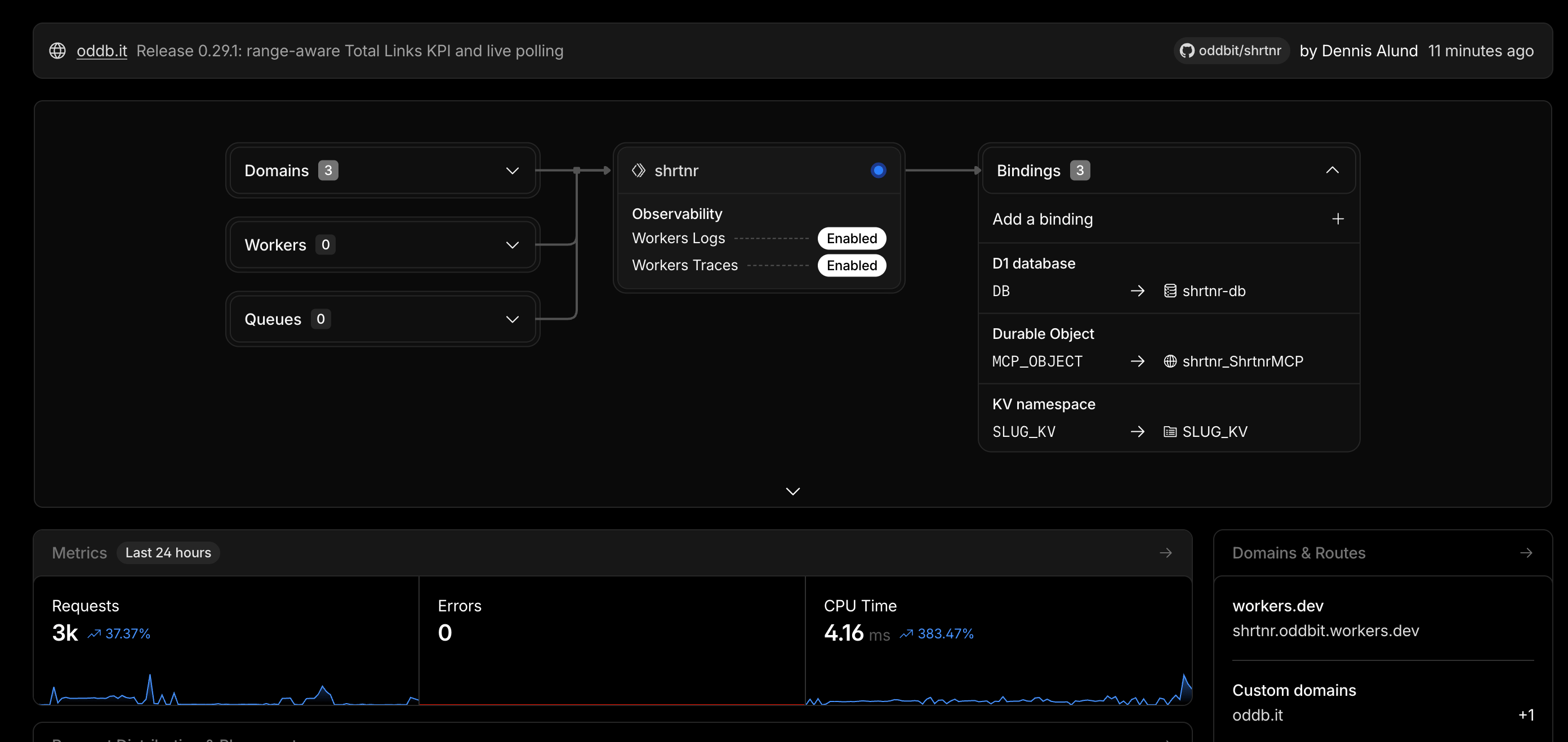
The entire deployment config lives in wrangler.jsonc. Worker bindings, D1 database, KV namespace, Durable Objects, observability settings. Tracing, invocation logging, and source map uploads are enabled by default. Production-grade observability without a separate monitoring stack.
What it costs
Shrtnr runs entirely within Cloudflare's free tier for most workloads.
Workers gives you 100,000 requests per day. That covers redirects, API calls, admin page loads, and any tool invocations. D1 gives you 5 GB of storage, 5 million row reads per day, and 100,000 row writes per day. KV is included with generous free-tier limits, and Durable Objects come bundled with Workers.
For context, 100,000 daily requests handles a company doing several million short link clicks per month, depending on how the traffic spreads across the day. Most teams will never need to move past the free tier. If you do, Cloudflare's paid plan starts at $5/month and scales linearly. Compare that to commercial shorteners that charge anywhere from $25 to several hundred dollars a month for infrastructure you do not control and cannot audit.
SDKs for every stack
Shrtnr ships native SDKs for TypeScript, Dart/Flutter, and Python, all wrapping the same public REST API. Pick the one that matches your runtime:
- TypeScript / Node / Deno / Bun / Browser:
@oddbit/shrtnron npm - Dart / Flutter / iOS / Android:
shrtnron pub.dev - Python 3.11+:
shrtnron PyPI
Each SDK covers the full API surface: link CRUD, slug management, bundles, analytics queries, and health checks. The shape is the same across all three, so a workflow you build in one stack ports cleanly to another. We add new SDKs as our own work and our clients' work demands them, so this list will grow.
Here is what link creation looks like in TypeScript:
import { ShrtnrClient } from "@oddbit/shrtnr";

const client = new ShrtnrClient({
  baseUrl: "https://your-domain.com",
  auth: { apiKey: "sk_your_api_key" },
});

const link = await client.createLink({
  url: "https://example.com/campaign",
  label: "Q2 launch",
});

const analytics = await client.getLinkAnalytics(link.id);
The Dart and Python clients follow the same constructor and method names. If your team ships a mobile app, a Python data pipeline, and a TypeScript backend, the Shrtnr integration looks the same in all three places.
Open source, Apache 2.0
The complete codebase is on GitHub. Apache 2.0 license. Fork it, modify it, run it on your own Cloudflare account. Every migration, every analytics query, every auth flow is visible and auditable.
We maintain Shrtnr because we use it daily. Our short domain oddb.it runs on it in production. Bug fixes and features land because we hit the edges ourselves, not because a roadmap committee decided they were important.
What we've learned running Workers in production
If you're considering Cloudflare Workers for a production workload, here's what we've taken away from Shrtnr and from building Workers-based systems for clients:
D1 is production-ready for read-heavy workloads. The analytics queries in Shrtnr run thousands of times a day without issues. Write performance is good for event recording at moderate scale. For high write throughput, you'll want to look at buffering strategies or Queues.
Hono is the framework to pick. We've tried multiple approaches on Workers, and Hono consistently gives you the best developer experience with the fewest runtime surprises. The TypeScript support is strong, and edge-native JSX rendering eliminates an entire category of frontend complexity.
Auth is simpler than you expect. Cloudflare Access handles identity federation, and layering API key auth on top is straightforward. You don't need a separate auth service for most products.
The free tier is real. We've been running production traffic through it for months. It works. The limits are reasonable, and the upgrade path is gentle. The bigger win is the operational cost: there are no servers to patch, no containers to right-size, no CDN to configure separately. That is where the real savings compound.
What's next
The next post in this series covers the piece that makes Shrtnr AI-native by default: the MCP server that lets AI assistants create links, pull analytics, and manage your entire link infrastructure without a human opening a browser. If your team is exploring AI-native workflows or MCP integration, that is the one to watch for.
About Oddbit
We're a senior software development team based in Bali, Indonesia, with roots in Sweden. We build custom software for startups and scale-ups: web applications, mobile apps, SaaS platforms, and the integrations that connect them. Our clients span the Nordics, Europe, and Southeast Asia, and we've been doing this for 9 years across 50+ projects.
Shrtnr is one of several open-source tools we've built and released. Others include Tanam (a Firebase CMS with AI content generation), Flutter packages with tens of thousands of downloads on pub.dev, and Firebase Genkit plugins for AI model integration.
If you're working through a technical architecture decision, evaluating edge computing for your product, or building something from scratch, talk to us. We'd rather show you our work than tell you about it.